

Track occupancy rates
- Go to Analytics > Occupancy.
- Select how long a period to show: 7D, 28D, 26W, or 12M. The period opens with today in the middle.
- To see an earlier or a later period, click the arrows next to the dates. Click the dates to return to the period around today.
- Select Day, Week, or Month to show one bar for each day, week, or month.
-
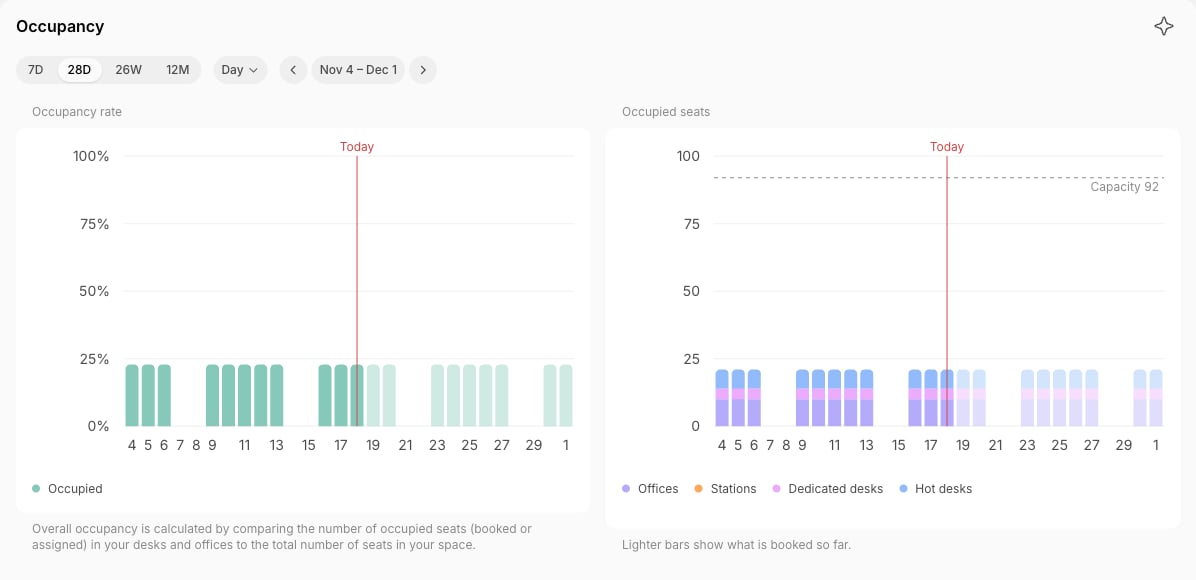
The Occupancy dashboard allows you to view:
- Occupancy rate — percentage of all desk and office seats occupied (either booked or rented (assigned) long-term) out of the total number of available seats in your space.
- Occupied seats — the number of occupied seats for each type of desk and office, next to the seats your space has (Capacity).
- Occupancy rate for each resource type — a breakdown of how each resource type is being utilized, split into Assigned and Booked.
How occupancy is calculated
The occupancy rate for each resource type is calculated as follows:- The Occupancy rate and Occupied seats charts count desk and office seats only. If you have none — renting out only rooms and equipment, for example — they show 0%. Click Occupancy to see the charts for each resource type instead.
- An assignment is counted in occupancy as taking a seat in full for the whole day. A booking counts only for the share of the day it covers, so a desk booked for 2 hours of a 10-hour day adds 20% of a seat to occupancy.
- Occupancy is measured against your public schedule when it’s enabled, and your default schedule when it isn’t.
- A resource with a custom schedule is measured against its own schedule.
- A day a resource is closed — a weekday outside the schedule, or a closed day — isn’t counted for that resource.
- A week or a month shows the occupied seats of all its days out of all the seats available on those days, so a busy week of five open days counts more than a quiet Saturday. Occupied seats shows the average open day of the week or month.
- Occupancy history starts on March 15, 2026. Days before it show no occupancy.
- For rooms, seating capacity isn’t taken into account — occupancy reflects only the share of the day’s hours that are booked.